



Quick summary:
Shopify has announced a new way to build themes, currently in developer preview. Templates go back to being Liquid files instead of JSON, pages are built from a new {% block %} tag mixed with plain HTML, and a new {% partial %} tag lets JavaScript refresh small parts of the page. Existing themes, including Horizon, keep working as they are, and there is nothing for merchants to install yet.
If you’ve been around Shopify for a while, you know they change how themes are built every few years. We had Online Store 2.0 and Dawn in 2021, then Horizon with theme blocks in 2025, and this looks like the next big step.
In the video I mostly gave my opinion on how this will affect merchants. In this post I’ll go through the actual changes in more detail, using the official documentation and Shopify’s new skeleton theme, and then come back to what I think it means for you if you run a store.
What was announced
Ben Sehl, a product director at Shopify, gave a talk at Shopify’s developer conference called Liquid: Back to the future, and wrote an article with the same title. It covers three things:
- A new theme architecture, where page structure lives in Liquid templates again
- Changes to the Liquid language itself
- A new version of Shopify’s skeleton theme that uses all of it
The documentation is on the developer preview page. Everything is behind a feature preview called Liquid July ‘26 changes, and Shopify says the tags and JavaScript helpers might still change before general release.
The skeleton theme is not a new Horizon
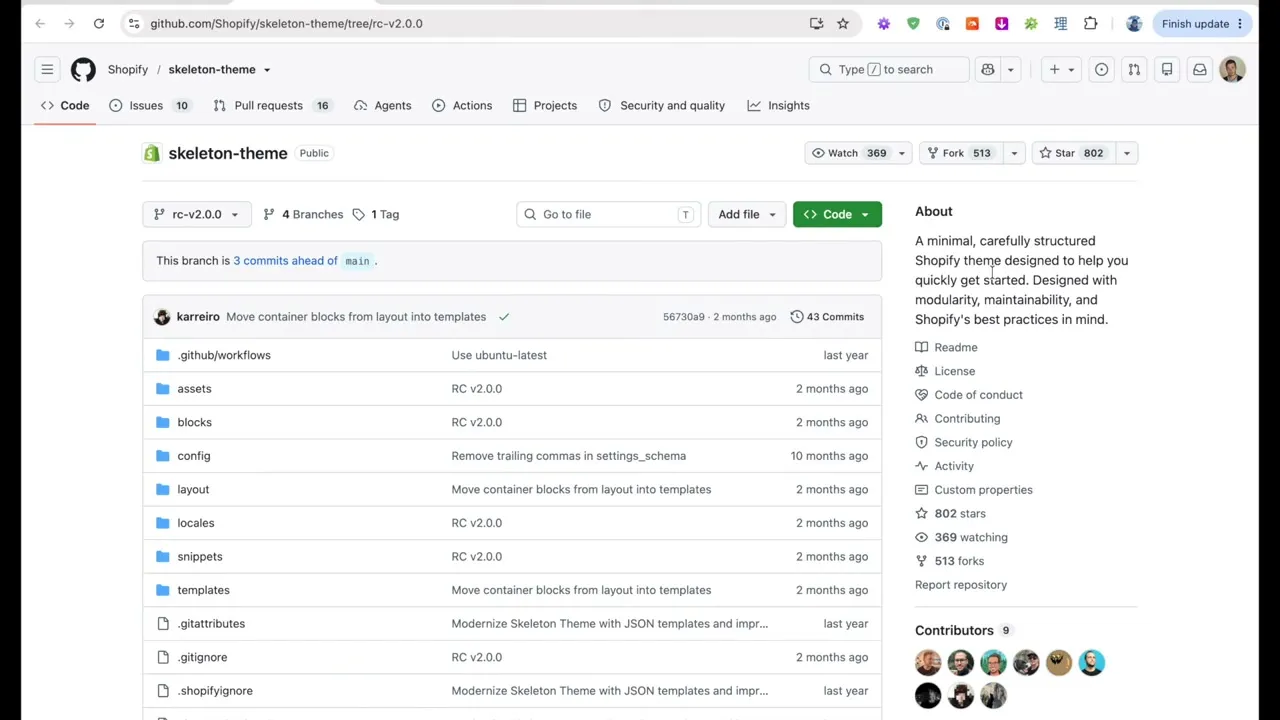
The skeleton theme is not for merchants to use. It’s a starter template for theme developers and theme companies, who might use it as a foundation for their next theme or just as an example of how Shopify intends the new features to be used.
It’s extremely bare bones. The product page is a list of images, a title, a price, a variant dropdown and an add to cart button. The collection page is a grid of product images, titles and prices with pagination. There is almost no styling and no features beyond the basics.
The folder structure shows the biggest change. There is no sections folder at all. The theme has assets, blocks, config, layout, locales, snippets and templates, and every file in templates ends in .liquid instead of .json.
According to Ben, the theme has 93% fewer lines of code than Horizon. That’s because it isn’t trying to be a complete theme. It gives developers the commerce basics and a structure to build on, and leaves the rest to them.
Why Shopify is changing direction
Ben’s article starts by remembering what building on Shopify was like 12 years ago with the Timber theme. The collection template was about 100 lines, and you could understand how the whole page worked just by reading it.
I remember this too. I’ve been working with Shopify for more than 10 years, and back then it was simpler and more enjoyable to work with than other platforms like WordPress. It was also very limited. As a store owner you couldn’t drag sections around, and apart from colours and a few theme settings, the layout of each page was fixed.
Then it slowly evolved. Sections arrived in 2016, Online Store 2.0 made sections available on every page, and Horizon added theme blocks, which turned the theme editor into something close to a page builder.
To save all of those arrangements, Shopify needed a data format, so templates became JSON files. A JSON template looks something like this (simplified):
{
  "sections": {
    "main": {
      "type": "main-collection-product-grid",
      "settings": {
        "products_per_page": 16
      }
    }
  },
  "order": ["main"]
}
That tells you which section is on the page, but nothing about what the page actually looks like. To understand it, you open the section file, then its blocks, then the schema, then the snippets those render. Shopify also tells developers not to edit JSON templates by hand, because the theme editor writes to them.
Speaking as a developer, I don’t really enjoy working with Horizon. It’s easy for something that should be a small, quick change to balloon into a much bigger job, because you want to change one thing and end up editing five different files. In my opinion it’s a bit over-engineered.
AI changes the equation
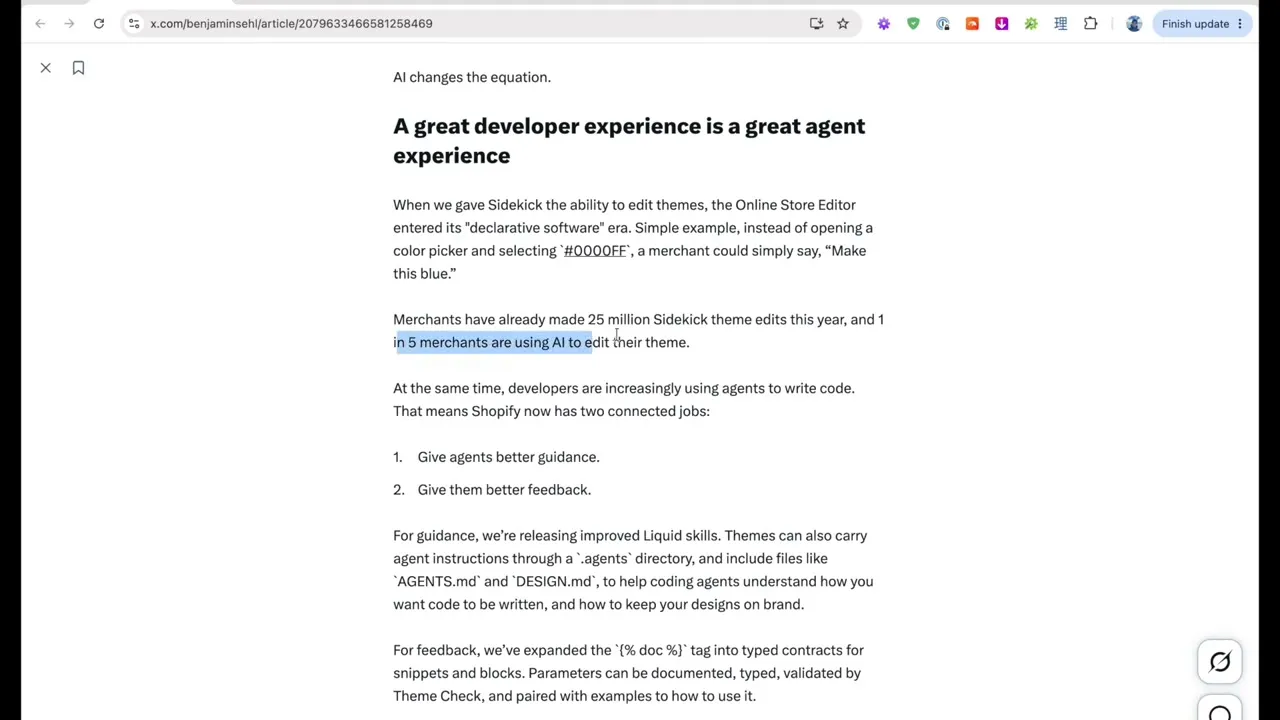
What changed in the last couple of years is AI. According to Ben, merchants have made 25 million theme edits with Sidekick this year, and 1 in 5 merchants are using AI to edit their theme.
Themes kept adding settings because settings were the only way a merchant could change something without a developer. If you can ask AI to make the change instead, you don’t need a setting for everything.
Ben gives the example of a section with one button, where the merchant wants a second button next to it. In a settings-based theme, the developer needed to have planned for that, either with a second button setting or a group block that can hold two buttons. In HTML, you add another button and wrap the two in a div. Every AI model already knows HTML very well, so it can make that change without the theme having planned for it.
The line from the article that sums it up is “a great developer experience is a great agent experience”. AI agents work by reading text. If the theme is simpler and more readable, they make fewer mistakes and spend fewer tokens working out what to change. The same goes for a human developer. If your theme is easier to understand, the developer spends less time on your changes, and you pay less for them.
Templates are Liquid files again
This is the biggest technical change. Here is the complete collection template from the skeleton theme:
{% block 'container' %}
  <h1>{{ collection.title }}</h1>

  <div class="collection-products">
    {% paginate collection.products by 20 %}
      {% for product in collection.products %}
        <div class="collection-product">
          {% if product.featured_image %}
            {% render 'image',
              class: 'collection-product__image',
              image: product.featured_image,
              url: product.url,
              width: 400,
              height: 400,
              crop: 'center'
            %}
          {% endif %}
          <div class="collection-product__content">
            <p>{{ product.title | escape | link_to: product.url }}</p>
            <p>{{ product.price | money }}</p>
          </div>
        </div>
      {% endfor %}

      {{ paginate | default_pagination }}
    {% endpaginate %}
  </div>
{% endblock %}
If you know some HTML and have seen Liquid before, you can read that from top to bottom and know exactly what the page will output. There’s a heading, a grid of products, and pagination at the bottom.
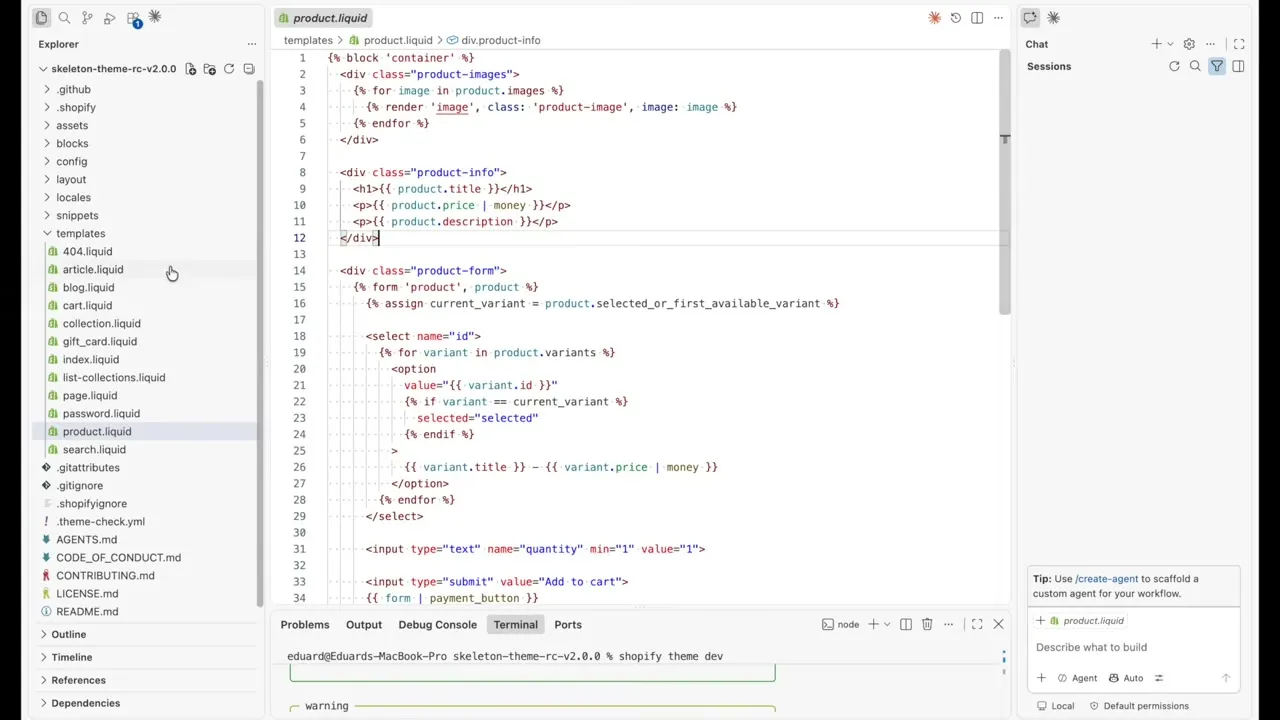
The product template works the same way. It’s 37 lines, and the add to cart form sits in the template itself instead of several files deep inside a section and its blocks.
This makes small changes much faster. It also means there will be fewer settings for merchants to play with, which I’ll come back to further down.
The new block tag
Blocks still exist, but you can now render them directly from a template with {% block %}. It works a lot like {% render %} for snippets, except it renders a file from the blocks folder, and that file can have theme editor settings.
There are three ways to pass things into a block:
- Named parameters, like
tag: 'h1'orclass: 'mb-2', which the block file reads as normal Liquid variables - Settings, like
block.settings.variant: 'button-primary', which set the value of one of the block’s schema settings - Body content, which is everything between
{% block %}and{% endblock %}, and which the block outputs with{{ block.content }}
This is the skeleton theme’s container block, which every template wraps its content in. I’ve removed the documentation comment and the schema:
{%- assign tag = tag | default: 'section' -%}

<{{ tag }} class="block-container" {{ block.shopify_attributes }}>
  {{ block.content }}
</{{ tag }}>
The template decides which HTML element to use through the tag parameter, and whatever the template puts inside {% block 'container' %} comes out where {{ block.content }} is. If you’ve used React or a similar component system, parameters work like props and the body content works like children, but it’s all still plain Liquid.
The docs split responsibility like this: parameters are for values the template controls, and schema settings are for values the merchant controls in the theme editor. A block can combine both with a fallback, so the template can set a value, and the merchant’s setting is used when it doesn’t:
{% assign variant = variant | default: block.settings.variant | default: 'button-primary' %}
<button class="{{ variant }}">
  {{ block.content }}
</button>
With JSON templates, the merchant controls how the page is put together. With the {% block %} tag, the template controls it, and merchants get the settings inside each block. The docs also suggest keeping blocks focused, with six settings or fewer. That’s a big change from Horizon, where some blocks have a very long list of settings.
Typed documentation with the doc tag
Every block in the skeleton theme starts with a {% doc %} tag that lists the parameters it accepts, what type they are, and an example of how to use it:
{% doc %}
  @param {string} [tag] - HTML element for the wrapper. Default: 'section'.

  @example
  {% block 'container', tag: 'div' %}
    ...
  {% endblock %}
{% enddoc %}
Theme Check reads these and warns you if you pass a parameter that doesn’t exist or has the wrong type. In VS Code with the Shopify Liquid extension you get autocomplete for them too. For AI agents, it’s a way to find out which parameters are valid instead of making one up. Shopify also added 20 new Theme Check rules as part of this release.
Themes can also include instructions for coding agents, in an .agents folder or in files like AGENTS.md and DESIGN.md. The skeleton theme has an AGENTS.md with the rules for editing it: no sections, no JSON templates, all CSS and JavaScript in the assets folder, and every block has to start with a {% doc %} header.
Partials
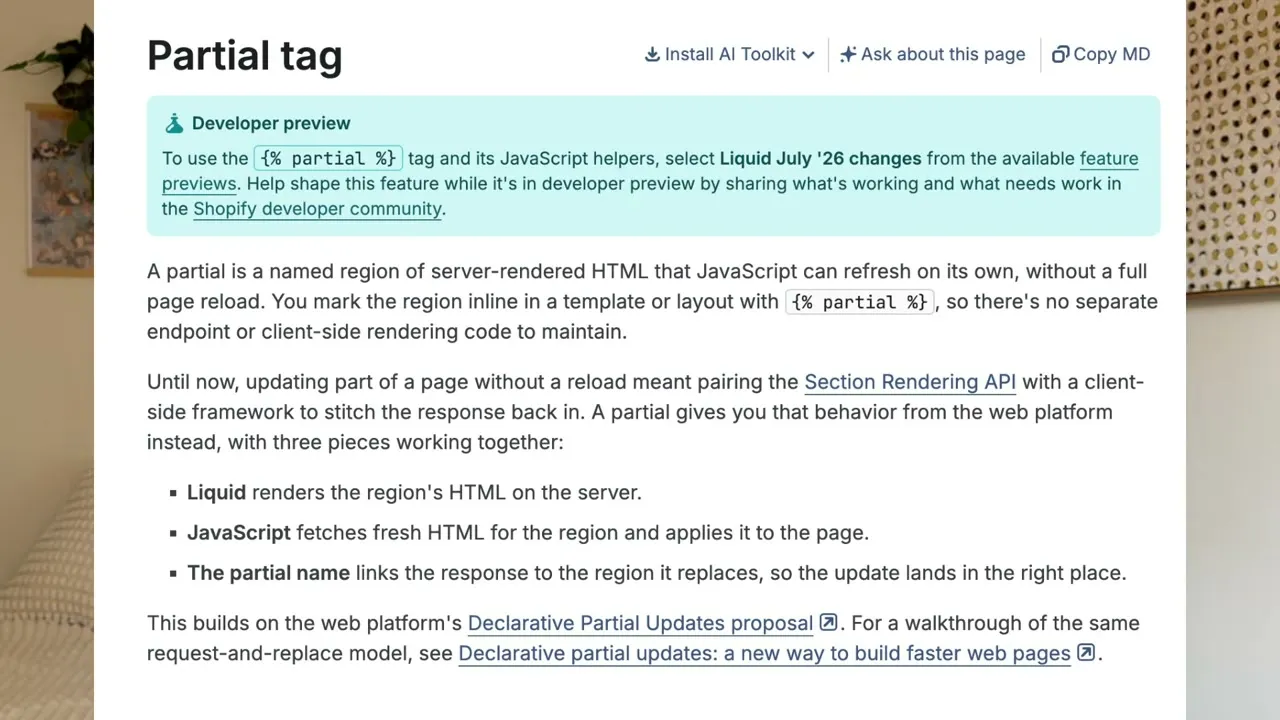
Most themes need to update part of the page without reloading it, for example the cart drawer after you add to cart, or the product grid when you apply a filter. Currently this is done with the Section Rendering API, which fetches the HTML of a whole section so JavaScript can swap it into the page. Themes carry a lot of custom JavaScript to make that work.
Partials do the same job with much less code. In the Liquid, you wrap the part of the page that needs updating and give it a name:
{% partial 'cart-count' %}
  <span>{{ 'cart.count' | t: count: cart.item_count }}</span>
{% endpartial %}
A couple of lines of JavaScript can then ask Shopify for a fresh version of that named region and swap it into the page, without re-rendering the whole section around it.
Ben says this one feature will let them remove thousands of lines of JavaScript from Horizon. For you as a store owner, that means less JavaScript loading on your pages and better performance.
Standard Actions and Events
Shopify is also adding a shared JavaScript API for common storefront actions, like updating the cart:
const { cart } = await Shopify.actions.updateCart({
  lines: [{ merchandiseId: variant.id, quantity: 1 }],
});
Every theme currently has its own add to cart code, and apps have to work around each theme’s version. With Standard Actions and Events, themes and apps call the same functions and listen for the same events. Ben says Standard Actions already work across Shopify stores.
Changes to Liquid itself
Liquid is getting some syntax that most programming languages have had forever: maths operators, && and ||, and arrays you can write directly.
{{ 1 + 1 }}
{{ false && false || true }}
{% assign products = ["shirt", "hat", "shoes"] %}
If you’ve ever written {{ price | plus: 10 }}, or split a comma-separated string just to get an array, you’ll know why this is nice. Shopify couldn’t add this earlier because the old Liquid parser accepted a lot of loosely written code, so new syntax could have changed how existing themes behaved. They moved themes onto a stricter parser first, which makes it safe to add new features now.
Tailwind support
Something else I’m excited about is Tailwind support, which Shopify says is coming to Liquid themes soon.
Tailwind is a CSS framework, basically a design system made of utility classes. The reason this matters is that right now every theme has a completely different CSS system. Dawn does it one way, Impact does it another way, and whenever I start working on a new store I have to figure out how that particular theme does things.
If themes from different companies start using the same system, it becomes much easier for developers to come in and make changes to your store. The same goes for AI, which is already very good at writing Tailwind.
Horizon is not going away
The skeleton theme is not a replacement for Horizon. Horizon will continue to be Shopify’s flagship free theme, and I don’t think they’re planning a new free theme just yet. Ben also makes it clear that this is not a forced rewrite. Sections, JSON templates and existing themes will keep working, and Liquid will stay backwards compatible.
I’m sure Horizon will slowly adopt some of these features though, partials especially.
What this means for merchants
The trade-off is fewer settings in the theme editor, and more things you ask AI to do instead. I think this has a couple of downsides.
The good thing about settings is that they show you what can be done. They give you ideas for different ways to design your page. If all you see is an empty prompt box, you don’t know what you don’t know.
I’m also wondering how Shopify will handle undoing changes. With AI, you can ask it to change something back and it won’t necessarily restore it exactly as it was. Developers solve this with version control like Git, which keeps a history of every change. I think Shopify might need to build in more robust version control, or some way to see the history of your theme. They haven’t said anything about that yet.
On the other hand, the number of settings is still up to the theme developer. In this architecture you can still build settings for anything you want, you just don’t have to. So every setting becomes a deliberate choice, a question to the merchant about whether they want it this way or that way. In Horizon, anything that appears on the page has to be a block and has to show up in the theme editor.
Trying it yourself
If you’re a developer and want to look at the code:
- Enable the Liquid July ‘26 changes feature preview on a development store
- Clone the skeleton theme from the
rc-v2.0.0branch - Run
shopify theme devto preview it
The {% partial %} tag only works when that feature preview is enabled. Without it, the storefront throws an “Unknown tag ‘partial’” error.
I’m curious what merchants think about this trade-off. Would you rather have more settings in the customizer, or fewer settings and an AI agent that makes changes for you? Let me know in the comments on the video.
See you in the next one!
Ed