



Quick summary:
Shopify’s built-in breadcrumbs are tied to collection-aware URLs, which are bad for SEO, and that’s why Dawn and the free themes ship without breadcrumbs at all. The fix is to control your breadcrumbs manually with metafields, so every product carries its own list of parent collections.
I’ve had a lot of requests for a video about breadcrumbs in Shopify, and specifically about getting proper Amazon-style multi-level breadcrumbs. For a long time my answer was that you’d need a developer to build it for you, because I didn’t have a solution I was happy with recommending.
That changed when I built a section you power with metafields, which gives you full manual control over the breadcrumbs on any product or collection page. Before I show you how it works, it helps to understand why Shopify makes this awkward in the first place.
Where your theme probably stands
Right now you’re in one of three situations. Your theme has no breadcrumbs at all, or it has a basic single-level breadcrumb that only links back to the home page, or you’re on an older theme with the classic Shopify breadcrumbs that follow the collection-aware URL.
The third situation is the one worth explaining properly, because that’s where the SEO problems come from.
Collection-aware URLs
A collection-aware URL is what you get when you reach a product by clicking through a collection. The collection stays in the URL:
/collections/collection-title/products/product-title
The classic Shopify breadcrumb reads that URL and displays the collection it finds there. That’s an oversimplification of the mechanism, but the URL and the breadcrumb are in sync.
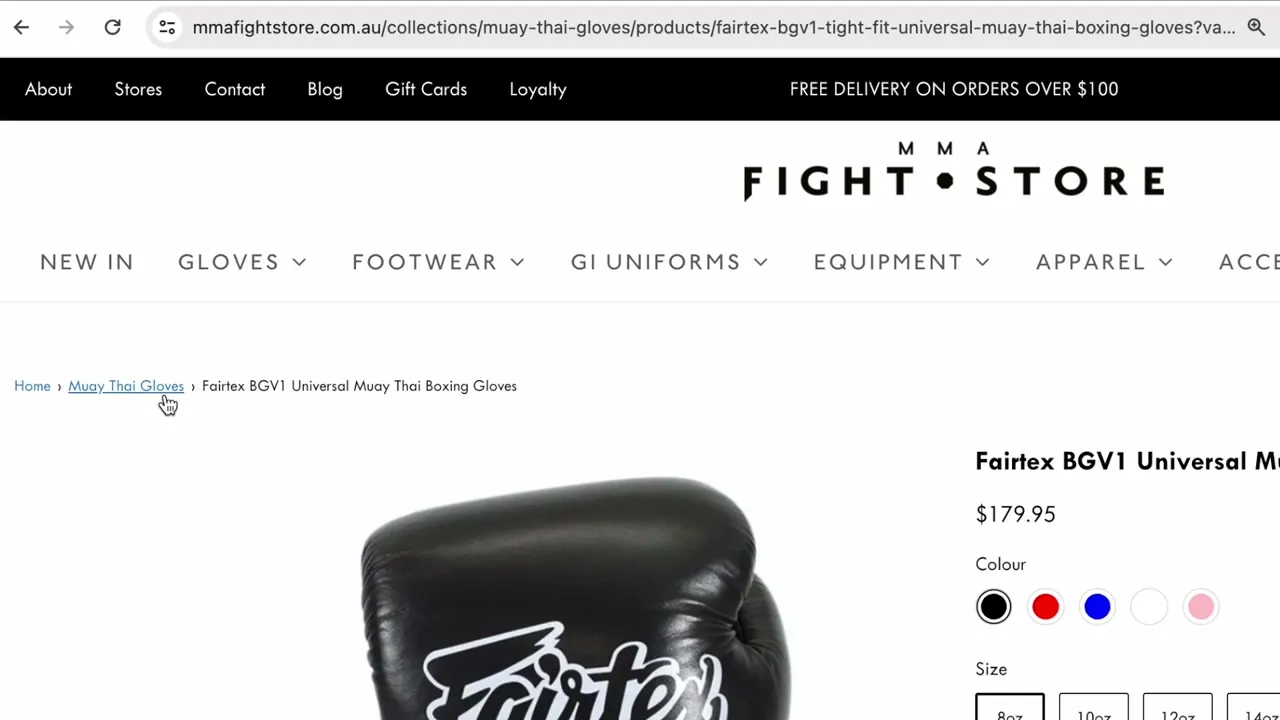
Most older themes work this way and plenty still do. So if the same pair of gloves sits in Muay Thai Gloves, 10oz Gloves and 12oz Gloves, you end up with three different URLs pointing at the same product page, each showing a different breadcrumb.
And then the canonical URL breaks it
Every product also has a canonical URL, which is the real official address of that product. You get to it by removing the collection part:
/products/product-title
Load that version and the breadcrumb has nothing to work with. There’s no collection in the URL, so all you get is a link back to Home and the product name.
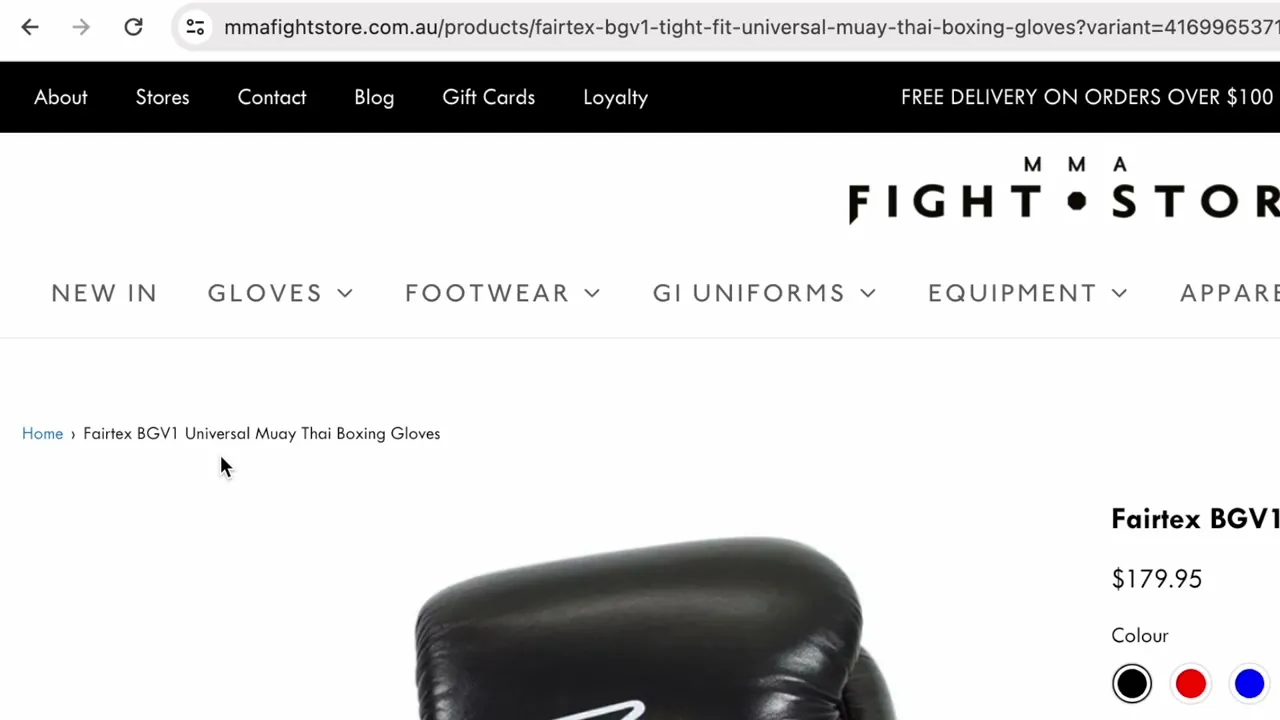
Nothing is broken exactly, but the breadcrumb has stopped being useful.
Why this is an SEO problem
Two things are going wrong at once here.
First, the breadcrumbs hand Google conflicting information. Google reads breadcrumbs, and if it sees the same product sitting under Muay Thai Gloves on one URL and 12oz Gloves on another, it can’t work out which collection this product actually belongs to.
Second, Google operates on URLs — as far as it’s concerned, a URL is a page. Five or six alternate URLs serving the same product content means Google has to do extra thinking to decide which one deserves to be indexed. Canonical tags exist to help with exactly this, and when everything is set up correctly Google will index the canonical page.
It doesn’t always work out that way. I’ve looked at Google Search Console for Shopify stores where Google was ignoring the canonical entirely.
So the best thing you can do is send Google to your canonical URLs, and that’s what modern themes started doing. Click into a product from a collection in Dawn and the URL goes straight to /products/product-title with no collection in it at all.
That’s great for SEO, and it also means the breadcrumb has nothing left to display. That’s why Dawn and all the free themes dropped breadcrumbs entirely. There’s not much point showing a breadcrumb that only ever says “Home”.
Manual breadcrumbs, powered by metafields
My solution is a section that lets you set the breadcrumb for every product and every collection yourself, with no dependency on the URL at all.
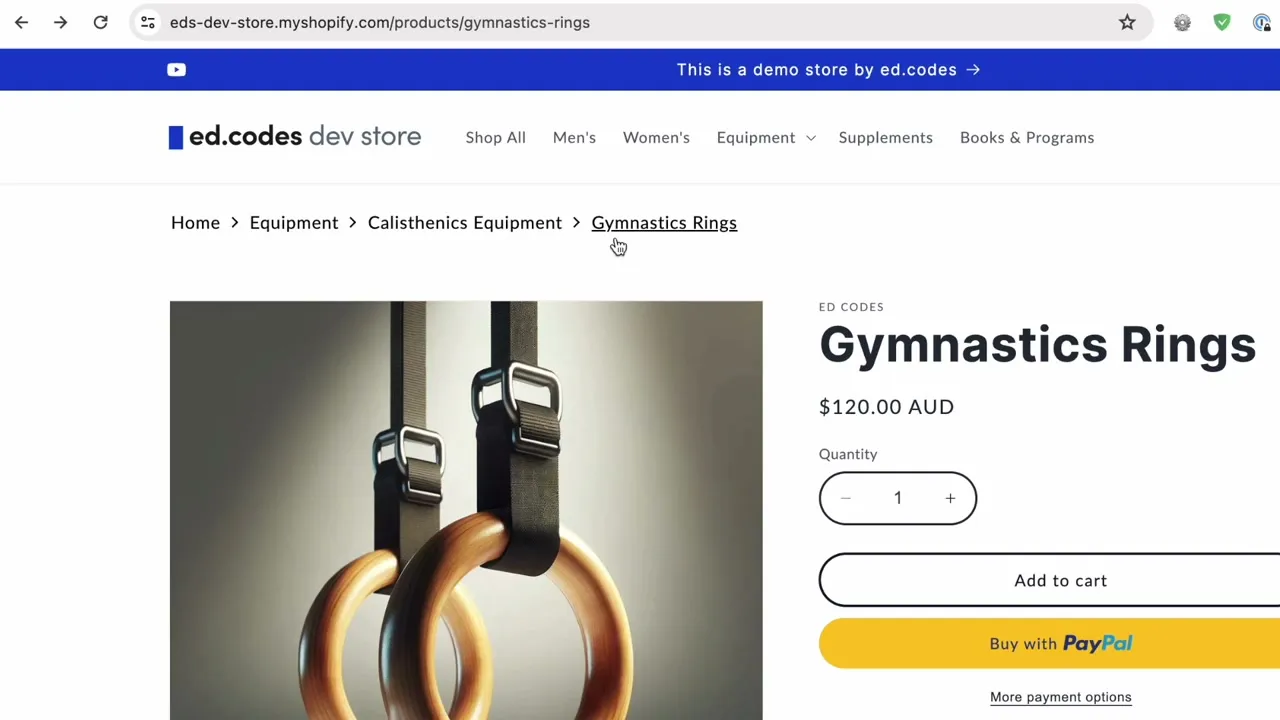
It behaves like any other section in your theme. You can drag it into the product template, the collection template, or into the header if you want it across the whole site. There are settings for padding and max width so you can line it up with your theme properly.
Personally I don’t use it in the header. It won’t look right on every theme, and if you’re doing this for SEO then the product pages are what matter, with collection pages a distant second.
The breadcrumb content itself comes from a metafield on each product.
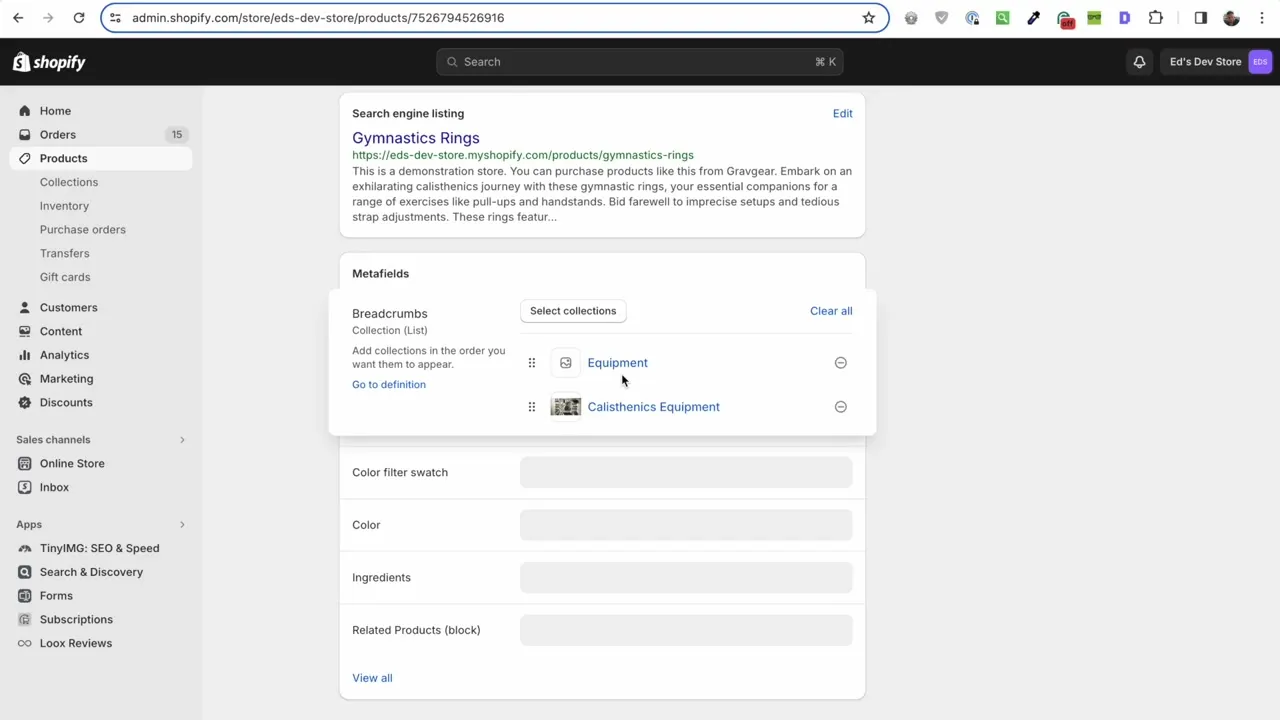
Scroll to the bottom of the product, click Select collections, and add the parent collections in the order you want them to appear. For these gymnastics rings, Equipment is my general collection and Calisthenics Equipment narrows it down from there. Save the product and the section displays the full path.
Collections work the same way. Add the parent collection to a collection metafield and your collection pages get breadcrumbs too.
Faking sub-collections
Shopify doesn’t have sub-collections. You can’t nest one collection inside another in the admin, and that’s a real limitation of the platform.
You’re already faking them though. Your mega menu probably has Shoes, and underneath it the types of shoes. The back end knows nothing about that hierarchy, and it doesn’t need to, because the organization lives in the front end of your store.
Breadcrumbs are the same idea applied to product pages. A customer can go up one collection level or two levels, which is far more useful than a product page with no way back. It’s also what Google wants to see — this product belongs to this grouping of related products, which sits inside this broader grouping.
Structured data is included
The section outputs the correct breadcrumb structured data automatically. Structured data is a specific format for handing information to Google so it can display your pages better in search results, and I’ve made a separate video on it if you want the background.
You don’t need to do anything to switch it on. It’s generated from the same metafields you’ve already filled in.
What happens on products you haven’t set up
Products where you haven’t filled out the metafield revert to the default Shopify breadcrumb structure. On a canonical URL that means a link to Home and the product name, which is all Shopify can really tell you. Nothing goes missing and nothing breaks, so you can roll this out gradually and start with your most important products.
Installing it
There’s one file to add and no other code changes. Open your theme’s code editor, find the sections folder, add a new section, clear out the default code, and paste mine in. I’d give the file a prefix — mine is ed-breadcrumbs.liquid — so that a year from now you can tell at a glance which files you added yourself, which matters when you move to an updated theme.
Refresh the customizer and you’ll be able to add the section wherever you want it.
On Dawn and the free themes there are two settings that will line it up with the rest of your content. Put the class page-width in the section’s class field, and set the side padding to 52px, because that’s what the free themes use. Do both and it sits exactly in line with everything else on the page.
Last step is the metafield definitions, under Settings > Custom data. Add a product metafield called Breadcrumbs, leave the namespace and key as custom.breadcrumbs since the code looks for that, and set the type to Collection, list of collections. Then repeat the same thing for collections, which you only need if you want breadcrumbs on your collection pages.
In the description field I’d write yourself a reminder like “add parent collections in the order you want them to appear”, so you don’t have to think about it every time.
Bulk editing
Going into products one at a time gets slow with a large catalogue. The built-in Shopify bulk editor now supports metafields, which wasn’t the case for a long time. Deselect every column except Breadcrumbs, set one product, then copy and paste that value down across all the products sharing the same structure.
If you want something more capable, Matrixify exports your metafields as CSV columns so you can edit them in Excel and import them back. Hextom Bulk Edit and Metafields Guru do similar jobs.
Where to get it
The section is $30 on my store — you can get it here. It’s a one-off payment instead of a monthly app subscription, and updates are free once you’ve bought it.
I don’t know how long this will remain the best approach. Some themes might start shipping their own metafield-powered breadcrumb section, or Shopify might add breadcrumbs to the Search & Discovery app alongside the filters. That’s only a guess, and I have no idea how long they’d take to do it. For now this is what I use.
I’m open to feedback on it, as I am with everything I build. If you have questions, leave a comment on the video.
See you in the next one!
Ed